Raspberry PI Pico や RP2040 に Mac OS Sonoma でファイルをコピーすると Input/output error になる場合
PythonRaspberry-Pi
2023-11-21 02:51 (2年前)
問題
Mac OS Sononoma で、 Rasberry PI Pico や RP2040 を載せてるマイコンボードの開発をしようとして、 ファイルを RP2040 にコピーした時に、
cp: code.py: could not copy extended attributes to /Volumes/CIRCUITPY/code.py: Input/output error
となって 0バイトでコピーされる。(中身がコピーされていない)
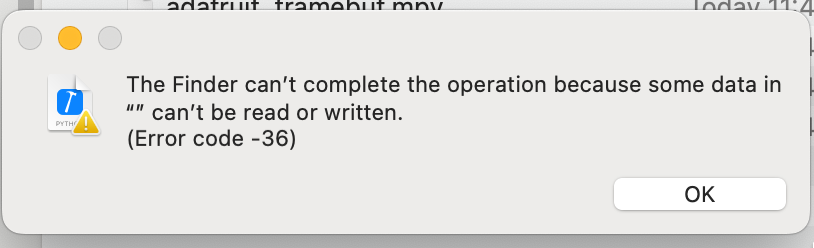
また、Finder でドラッグアンドドロップした場合は
The Finder can’t complete the operation because some data in “” can’t be read or written.
(Error code -36)
のエラーダイアログが表示される。
解決方法
ボリュームを synchronous でマウントしなおせば良い。
以下のスクリプトでマウントしなおしができる
#!/usr/bin/env zsh

m=$(mount | grep /Volumes/CIRCUITPY | grep synchronous)

if [ ! "$m" ]; then
  devname=$(df | grep CIRCUITPY | cut -d" " -f1)
  sudo umount /Volumes/CIRCUITPY
  sudo mkdir /Volumes/CIRCUITPY
  sleep 2
  sudo mount -v -o sync -t msdos $devname /Volumes/CIRCUITPY
fi
参考情報
原因
Sonoma では、ファイルのコピーをする際、まず仮想ファイルを作って、ファイルシステムへのページアウトがトリガーされる。 非同期でマウントされている場合、FAT とメタデータへの更新はフラッシュされるまで遅延されるため、0バイトファイルとなる。
8MB以下、FAT16、uf2、Python ファイルの書き込み の条件下で問題となる。
https://github.com/adafruit/circuitpython/issues/8449#issuecomment-1745372269
私の解決策
下記のようなデプロイスクリプトを作りました。
remount.sh
#!/usr/bin/env zsh

ret=$(mount | grep /Volumes/CIRCUITPY | grep synchronous)

if [ ! "$ret" ]; then
  devname=$(df | grep CIRCUITPY | cut -d" " -f1)
  sudo umount /Volumes/CIRCUITPY
  sudo mkdir /Volumes/CIRCUITPY
  sleep 2
  sudo mount -v -o sync -t msdos $devname /Volumes/CIRCUITPY
fi
deploy.sh
#!/usr/bin/env zsh

cd $(dirname $0)

# Sonoma以降、ファイルのコピーで Input/output error になる問題の対応
./remount.sh

files=(
  file_1.py
  file_2.py
)

for file in $files; do
  echo $file
  cp $file /Volumes/CIRCUITPY/
done

# ゴミファイルを消す
dot_clean /Volumes/CIRCUITPY
ls -lhatr /Volumes/CIRCUITPY
評価をお願いします (会員登録・ログイン不要)
まだ評価がありません
著者は、アプリケーション開発会社 Cyberneura を運営しています。
開発相談をお待ちしています。
開発相談をお待ちしています。