EmDash is slow (as of v0.9.0)

I tried EmDash, a CMS that Cloudflare announced in April 2026. It is a full-stack CMS that runs on Astro + Cloudflare Workers + D1 + R2, and it claims to be the "spiritual successor to WordPress". It has an AI agent first design, so it works well with agents, and writing your own plugin is relatively smooth too.
I had expectations when I tried it, but it feels clearly slow.

▲ A site with the demo data that you can install when building an EmDash site. This is what I measured.
How slow
I deployed the default demo project generated by create-emdash (a typical blog with a post list on the top page) to Cloudflare Workers and measured the response time. The plan is Cloudflare Workers Paid ($5/month).
=== Top page (with post list) ===
0.925s  TTFB=0.916s
0.505s  TTFB=0.501s
0.582s  TTFB=0.580s
0.486s  TTFB=0.484s
0.481s  TTFB=0.380s

=== /about page (text only, no images, minimal data fetching) ===
0.420s  TTFB=0.408s
0.464s  TTFB=0.458s
0.960s  TTFB=0.943s
0.511s  TTFB=0.507s
0.410s  TTFB=0.392s
480ms to 925ms for the top page, and 410ms to 960ms even for the text-only about page. With more attempts, some requests hit a cold start and reach 2 to 3 seconds.
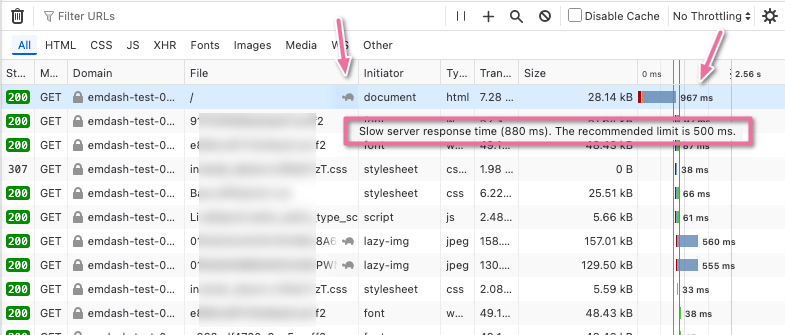
The browser also detects this slowness correctly. Firefox's developer tools show a turtle icon warning next to the document request. The text is "Slow server response time (880 ms). The recommended limit is 500 ms.", so it is judged clearly slow by the browser's objective standard as well.
Comparison
For reference, here are measurements of other sites I run.
| Site | Stack | Measured (TTFB) |
|---|---|---|
| www.cyberneura.com | Astro (SSG) + AWS Amplify Hosting / no RDB | 30ms (cold 160ms) |
| www.ytyng.com | SvelteKit (SSR) + Django Ninja API / PostgreSQL | 100ms |
| chat-attendant.cyberneura.net | SvelteKit (SSG) + Cloudflare Pages / no RDB | 65ms |
| emoji.ytyng.com | SvelteKit (SSG) + Vercel / no RDB | 32ms |
| emdash-test-01 (this one) | EmDash 0.9.0 + Cloudflare Workers + D1 + R2 | 480 to 960ms |
The one that can be compared with EmDash as a use case is www.ytyng.com (this site), which is a blog. Compared with it, EmDash is about 5 times slower.
Compared with the SSG (static) sites, it is 20 to 30 times slower.
"Is it just my setup?"
I suspected that and looked for other people's reports. It is not just my setup. It is a structural property of EmDash on Cloudflare Workers + D1.
A detailed third-party benchmark
shift64: "I Bought the Domain Before I Ran the Test. EmDash Still Lost to WordPress."
| EmDash | WordPress | Ratio | |
|---|---|---|---|
| Server processing | 543 ms | 84 ms | WordPress is 6.4 times faster |
| Total TTFB | 596 ms | 136 ms |
I quote the conclusion of the author (who was favorable to EmDash and had expectations for it).
An SEO professional reviewing crawl-stats charts blind classified the EmDash performance as needing to be "scrapped and rebuilt" (~1,300 ms zone), while the WordPress site landed in "normal, expected" territory.
After aggressive optimization, the gap narrowed only to 4.1× slower, still insufficient for recommendation.
The fundamental issue stems from architecture — D1 database round-trips at the edge create an unavoidable latency floor that optimization cannot overcome without platform-level changes to Cloudflare's infrastructure.
This almost matches my own measurement (596ms vs 596ms), so the numbers can be considered reproducible.
Other independent voices
- Maciek Palmowski: EmDash a fresh take on CMS points out that "EmDash does not even target what WordPress users really struggle with: performance / hosting cost / plugin bloat". EmDash's main focus is AI agent first and plugin security
- Hacker News thread (47602832) has few direct mentions of performance, but the overall tone of the reaction is "the architecture is interesting, but we have heard this story before"
Beware the contrary numbers
On the other hand, some articles say "EmDash is blazing fast", but if you read them carefully, the numbers are taken in a different way.
- Lushbinary: "P50 latency 1-3ms" measures a simple TCP/HTTP hop of the Worker and does not include the rendering time of the EmDash app itself
- dev.to: "sub-50ms TTFB" is only about the distance to the edge location. It is not a measurement and is closer to marketing
Don't be misled by these. It is better to trust the shift64.com numbers, which are based on real measurements.
What's slow
The Server-Timing header that EmDash outputs shows the breakdown. For the request I measured this time, it was as follows.
setup;dur=61          probe
rt;dur=89             runtime init total
  rt.db;dur=23        D1 migration check
  rt.plugins;dur=10   _plugin_state load
  rt.site;dur=12      site info options
  rt.market;dur=15    marketplace plugins
  rt.hooks;dur=29     exclusive hook resolution
render;dur=346        ← page render (D1 fetch for posts/media/menus)
mw;dur=496            ← total middleware (sum of the above)
What matters here is that the rt.* runtime init runs on every request. The migration check, the plugin state load, site info, and hook resolution are all independent SELECTs against D1. In many places EmDash does not parallelize them, so they add up.
In addition, the 346ms of render is Astro's page render + EmDash's content fetch + Portable Text rendering. Here too, the post list, menus, related media and so on are fetched from D1 with multiple queries.
Cloudflare's D1 is SQLite from the code's point of view, but in reality it is a SQLite server across the edge network. Each query takes a 5 to 15ms round trip, and these add up to the 500ms level.
According to shift64's benchmark:
The fundamental issue stems from architecture — D1 database round-trips at the edge create an unavoidable latency floor that optimization cannot overcome without platform-level changes to Cloudflare's infrastructure.
Unless the platform side (Cloudflare's D1) is reworked, application-layer optimization cannot get past this.
Mitigations that exist
They do not solve it completely, but there are some mitigations.
- Add
Cache-Control: public, max-age=Nto public pages → If it becomes a Cloudflare CDN cache hit, it is at the millisecond level. But it cannot be used for admin / preview / dynamic APIs where authentication is involved - D1 Sessions API (read replica). It is enabled by putting
session: "auto"inastro.config.mjs. But the effect is small unless a read replica is geographically close - Call Astro's
Astro.cache.set(cacheHint)in pages. This rule is also written in theCLAUDE.mdof the EmDash template - Deploy to Node.js + local SQLite (containers). It improves dramatically to
~85ms TTFB, but you lose the benefits of Workers
Does the $5 plan fix it?
No. What changes with Workers Paid ($5/month) is only the CPU time limit (Free 10ms → Paid 30/50ms) and the billing model. It has nothing to do with the number of D1 round trips per request or the latency across the edge.
If CPU-heavy processing (image conversion, etc.) occurs, there is a difference, but EmDash's main flow is mostly I/O, so upgrading to $5 hardly changes the TTFB you experience.
What about the EmDash project itself?
Searching the Issues of emdash-cms/emdash with performance-related keywords, I find no open issue dedicated to performance. The core team does not make speed a main goal (the official tagline is Plugin Security and AI agent-first).
In other words, at this point there is no sign that a fundamental improvement on the framework side is being actively pursued.
At this stage, I feel that there are many risk factors in adopting it for production.
For hands-on work, for play, or as an experiment in AI agent integration, there is no problem at all. Being able to operate a CMS programmatically from an AI agent is a real strength of EmDash, so for that use, speed can come second.
However, for a production site where traffic is expected, putting adoption on hold for now is the reasonable choice. As you add more features on the app side, lifecycle hooks and plugin loading increase, and it can only go in the direction of getting even slower (unless a fundamental improvement to the framework comes in).
I think the realistic option is to wait for the EmDash team or Cloudflare to rework the D1 architecture (for example, a form that embeds SQLite inside the app Worker).
Related posts


We look forward to discussing your development needs.